Reduction Guide for FOCES
Introduction to the Instrument
Fibre Optics Cassegrain Echelle Spectrograph (FOCES, Pfeiffer et al. 1998 [4]) was originally mounted to the Cassegrain focus of the 2.2m telescope in Calar Alto Observatory, Spain. After 15 years of operation, the spectrograph was brought back to University Observatory Munich (USM) for a major upgrade (Grupp et al. 2009 [1], 2010 [2]) to meet the requirements for precise spectroscopy, such as searching for extra-solar planets with the Doppler method. In the summer of 2017, FOCES was successfully mounted on the 2m Fraunhofer Telescope (Hopp et al. 2014 [3]) at the Wendelstein Observatory in Southern Bavaria, Germany. FOCES is connected to a Nasmyth focus of the telescope via an octagonal multi-mode optical fiber. FOCES has a resolving power (R) of ~70,000, and covers the wavelength range of 390—900 nm.
The characteristics of FOCES are summarised as below:
| Main-disperser | Spectral resovling power | R = λ/Δλ = 70,000 |
| Groove density | 31.6 lines mm−1 | |
| Blazing angle | 65° | |
| Corss-disperser | A pair of prisms | |
| CCD Detector | Wavelength coverage | 390 — 900 nm |
| Number of pixels | 2048 x 2048 | |
| Pixel size | 13.5 μm | |
| Sampling per resolution element | ~2.3 pixels | |
| Others | Link to the telescope | A circular multi-mode fiber (100 µm) |
| Wavelength calibration | ThAr/astrocomb simultaneous reference | |
Getting Started
Extracting one-dimensional spectra for FOCESis basically the same as the general procedure of GAMSE. In brief,
gamse configgamse listgamse reduce
FOCES is a double-fiber spectrograph.
There are two different fiber modes: “single” and “double”.
When running gamse config, the program asks the user which mode the data
is obtained with.
The “single” mode means ALL the raw images in the observing run are taken with
only the science fiber (Fiber A), and the calibration fiber (Fiber B) is not
used during the observing run.
While the “double” mode means at least one of the raw images in that night is
taken with both the science and calibration fibers.
In this case, the data shall contain calibration frames (flat field and Th-Ar
hollow cathren lamp) for each fiber individually.
Config File
The entries in the config file for FOCES data reduction is basically the same as the general list of accepted entries of GAMSE. However, there are a few entries to be paid attention to:
- [data] section
- fibermode: Optional values are “single” and “double”. As FOCES has
ability of double-fiber simultaneous observation,
fibermode = doubleis necessary to reduce the data taken under double-fiber mode. GAMSE always ask the user which mode is in when runninggamse config.
- fibermode: Optional values are “single” and “double”. As FOCES has
ability of double-fiber simultaneous observation,
Naming Convention
The filenames of FOCES raw images follow the convention below:
YYYYMMDD_NNNN_XXXYYZZ_AAAA.fits
Where
YYYYMMDD: Year, month and day of the observing run. For example,20150730is July 30th. 2015;NNNN: An unique daily exposure number from 0001 to 9999;XXXYYZZ: Instrument code and config number.XXXis the instrument descriptor (FOCstands for FOCES);YYZZis the year and instrument config number. For example,1501for setup 01 of the year of 2015. Config number counts up with hardware changes, such as new fibers, changed alignments, and new calibration lamps.
AAAA: The 4-letter code for object type. The codes and objects are listed below:Code Object in Fiber A Object in Fiber B Typical exposure time (sec) BIAS — — 0.00002 FLS0 Flat for red band — 30 FLS1 Flat for green band — 120 FLS2 Flat for blue band — 480 FLC0 — Flat for red band 0.3 FLC1 — Flat for green band 1.2 FLC2 — Flat for blue band 4.8 THS0 ThAr — THS1 ThAr — THC0 — ThAr THC1 — ThAr THCS ThAr ThAr COS0 Astro Comb — COC0 — Astro Comb COCS Astro Comb Astro Comb SCI0 Star — SCI1 Star SCC2 Star Astro Comb SCT2 Star ThAr
Observing Log
The following command scans all the FITS files in the data path as specified in the configure file:
gamse list
GAMSE will extract some information from the FITS files and print an
observing log as a table in the terminal:
------- ------------------------------ ------- ------------ ------- ----------------------- ------- ------
frameid             fileid             imgtype    object    exptime         obsdate          nsat    q95
------- ------------------------------ ------- ------------ ------- ----------------------- ------- ------
      0 20180718_0001_FOC1800_SCI0       sci   Unknown           20 2018-07-18T20:55:47.000       0  23228
... ...
      0 20180718_0017_FOC1800_THA1       cal   ThAr             1.5 2018-07-18T21:44:26.000   13503   1069
      0 20180718_0018_FOC1800_SCI0       sci   Unknown          180 2018-07-18T22:23:37.000       0    943
... ...
      0 20180719_0012_FOC1800_THA1       cal   ThAr             1.5 2018-07-19T01:43:28.000   13305   1066
      0 20180719_0013_FOC1800_THA2       cal   ThAr               3 2018-07-19T01:45:35.000   23582   1241
      0 20180719_0014_FOC1800_FLA1       cal   Flat             1.5 2018-07-19T01:50:33.000       9  21349
      0 20180719_0023_FOC1800_FLA1       cal   Flat             1.5 2018-07-19T02:06:39.000      84  21687
      0 20180719_0024_FOC1800_FLA1       cal   Flat             1.5 2018-07-19T02:08:15.000      92  21701
... ...
      0 20180719_0025_FOC1800_FLA2       cal   Flat               6 2018-07-19T02:10:22.000  338893  64638
      0 20180719_0026_FOC1800_FLA2       cal   Flat               6 2018-07-19T02:12:03.000  339258  64640
      0 20180719_0027_FOC1800_FLA2       cal   Flat               6 2018-07-19T02:13:49.000  339597  64638
... ...
      0 20180719_0035_FOC1800_BIA0       cal   Bias            0.01 2018-07-19T02:31:27.000       0    908
      0 20180719_0036_FOC1800_BIA0       cal   Bias            0.01 2018-07-19T02:33:08.000       0    908
... ...
------- ------------------------------ ------- ------------ ------- ----------------------- ------- ------
Meanwhile, a text file with the name of 2018-07-18.obslog containing almost
the same table will be created in the working directory.
The columns have the explicit meanings as shown in the header.
nsat is the number of saturated pixels of the whole image, and q95 is
the 95% quantile value of all pixels.
The values of these two columns are extracted from the FITS images and the
others are taken from the FITS headers or generated automatically (frameid
and imgtype).
See Observing Log for more details about this table.
Since the target names of FOCES observations are not written into the headers of FITS files, the user has to open the obslog file with a text editor and make some changes manually.
The obslog files will NOT be overwritten by running gamse list, but new
files named 2018-07-18.1.oblog, 2018-07-18.2.oblog… with extra numbers
will be generated if there are existing obslog files in the working directory.
If there are more than one .obslog files, GAMSE will use the first one.
that is why the user is advised to verify that ONLY the .oblog file which
should be used during data reduction remains in the working directory.
Starting Data Reduction
After preparation of the configuration file *.cfg and the observing log file
*.obslog, one can start the data reduction by running:
gamse reduce
The following entries are accepted in the [reduce] section of the
configuration file:
| Key | Type | Default Value | Description |
|---|---|---|---|
| midproc | str | midproc | Path to the mid-process folder. |
| report | str | report | Path to the 1d spectra folder. |
| onedspec | str | onedspec | Path to the report folder. |
| mode | str | normal | Reduction mode. Available modes are “normal”, “debug” and “fast”. |
| oned_suffix | str | ods | Suffix of the 1d spectra files. |
| fig_format | str | png | Format of figures. |
Overscan Correction
The FOCES CCD has a pre-readout and a post-readout overscan regions at the left and right sides of the images, as shown below:
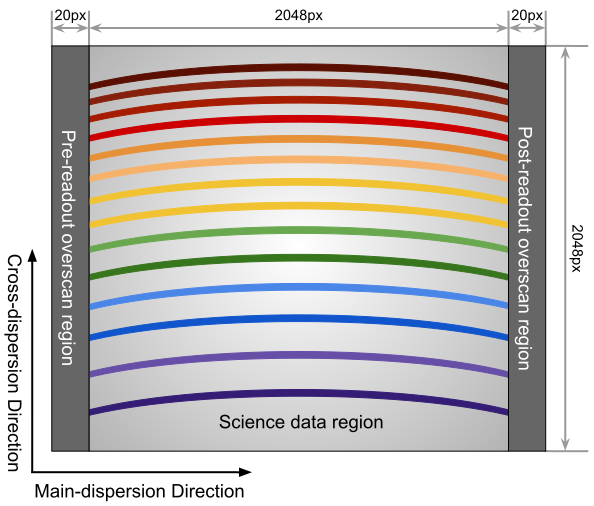
A schematic view of a FOCES image with 1x1 binning. The direction displayed is the same as the default direction in SAO-DS9, i.e., the zero point locates at the lower-left corner. The figure is not to scale.
The science data region has 2048 x 2048 pixels, attached with two overscan regions, each with a width of 20 columns.
GAMSE computes the mean values of the pre-readout overscan regions as the overscan level of the whole image. Due to the incomplete cleaning of pixel charges, the values in the post-readout regions are on average a few ADUs higher than the pre-readout regions and therefore not used in the data reduction.
GAMSE does the overscan correction for every image throughout the data reduction processes.
Bias Correction
GAMSE finds images marked with Bias in the observing log, and combines
them in a mean-stack with additional upper sigma-clipping.
The resulting Master-Bias is saved as a FITS image as specified in th
e configuration file.
There are usually some spatial patterns across the bias images. GAMSE is capable of smoothing this image with a Gaussian core.
The behaviors during the bias correction are controlled by the reduce.bias
section in the configuration file.
It accepts the following entries:
| Key | Type | Default Value | Description |
|---|---|---|---|
| bias_file | str | ${reduce:midproc}/bias.fits | Full path to the bias image. |
| cosmic_clip | int | 10 | The upper clipping value in the bias combination. |
| maxiter | int | 5 | Maximum number of interation in the bias combination. |
| smooth | bool | yes | Smooth the combined bias if yes. |
| smooth_method | str | Gaussian | Method of bias smoothing. Only valid if smooth = yes. |
| smooth_sigma | int | 3 | Sigma of Gaussian core in bias smoothting. Only valid if smooth_method = Gaussian. |
| smooth_mode | str | nearest | Mode of smoothing at the edges. Only valid if smooth_method = Gaussian. |
Order Tracing
The order detection and location of FOCES data follow the standard method of GAMSE. Orders are detected in combined flat field images. The example below shows the result of the order detection algorithm in a combination of 11 flat images. Totally 85 échelle orders are found and numbered as 0, 1, 2 … 84. All the images have exposure times of 1.5 seconds.
The behaviors during the order tracing are controlled by the reduce.trace
section in the configuration file.
It accepts the following entries:
| Key | Type | Default Value | Description |
|---|---|---|---|
| minimum | int | 8 | |
| scan_step | int | 100 | |
| separation | str | 500:26, 1500:15 | |
| filling | float | 0.3 | |
| align_deg | int | 2 | |
| display | bool | no | |
| degree | int | 3 |
Flat Fielding Correction
FOCES users usually take different groups of flat fielding frames with different
exposure times, to optimize signal-to-noise in different regions of the CCD.
GAMSE combines flat field images with the same exposure time, and assigns an
independent name flat_XX for each combined flat image, where XX is the
exposure time.
For example, flat_1.5 is the combination of all the flat field frames having
the exposure times of 1.5 seconds.
These combined flat images are then stitched together in a mosaic way to
optimize for signal-to-noise in different regions of the CCD generating the
so-called master flat image, which is by default named flat.
The stitching lines are some curves lying between échlle the orders and are
determined automatically by the software.
Background Correction
One-dimensional Spectra Extraction
Wavelength Calibration
Format of Output Spectra
APIs
gamse.pipelines.foces.make_config |
|
gamse.pipelines.foces.make_obslog |
|
gamse.pipelines.foces.reduce_rawdata |
|
gamse.pipelines.foces.common.correct_overscan |
|
gamse.pipelines.foces.common.combine_bias |
|
gamse.pipelines.foces.common.get_bias |
|
gamse.pipelines.foces.common.get_mask |
|
gamse.pipelines.foces.common.print_wrapper |
|
gamse.pipelines.foces.common.get_primary_header |
|
gamse.pipelines.foces.plot_overscan_variation |
|
gamse.pipelines.foces.plot_bias_smooth |
|
gamse.pipelines.foces.reduce_singlefiber.reduce_singlefiber |
|
gamse.pipelines.foces.reduce_doublefiber.reduce_doublefiber |
|
gamse.pipelines.foces.flat.smooth_aperpar_A |
|
gamse.pipelines.foces.flat.smooth_aperpar_k |
|
gamse.pipelines.foces.flat.smooth_aperpar_c |
|
gamse.pipelines.foces.flat.smooth_aperpar_bkg |